
22 Apr GetResponse Review – Basic but Effective
GetResponse is a basic reliable email marketing solution that’s well-suited for smaller businesses just starting with digital marketing. When Kim and I got started, our coaches all pointed us to Aweber for email automation and didn’t mention GetResponse. I was curious to see how they compare so I will be sure to put GetResponse vs Aweber points below.
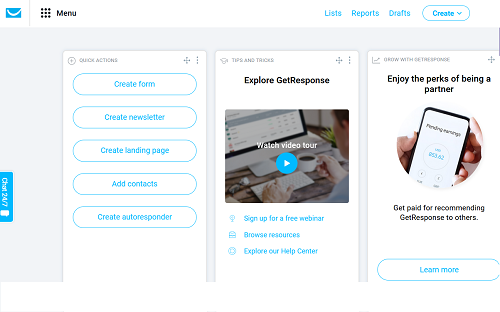
While GetResponse’s dashboard is sparse in comparison to other platforms, it’s easy to use and has intuitive automation workflow. With some basic analytics and intuitive dashboard layout, GetResponse is a good choice for beginners. On the marketing automation front, GetResponse isn’t a totally bare bones solution either. It has an intuitive workflow that walks users through the automation process without much of a learning curve.
GetResponse Pricing and Plans
GetResponse offers pricing for wide range of businesses. However, they do not offer a free plan like Aweber, they only offer a 30-day free trial period. Here are the rest of the details on their pricing:
- The least expensive plan is the $15-per-month email tier, which lets you contact up to 1,000 subscribers.
- Packages with access to the AutoFunnel feature (more on that below) start at $49 per month with the Plus plan.
- The Basic Plan scales up to a maximum of $450 per month for 100,000 contacts.
- Unlike Aweber, GetResponse charges per user – The first five user accounts are $20 per month, and additional users are $5 per month
- Aweber plans top out at $149 per month – (no extra user fees)
Each plan is available on a month-to-month basis. If you sign up for an annual contract, then will receive an 18% discount on every tier. If you prepay for 2 years of service, they will give you a 30% percent discount.
GetResponse Integrations
- Salesforce for CRM solutions
- PayPal for ecommerce payment
- Square for ecommerce payment
- Stripe for ecommerce payment
- WordPress integration. For landing pages
- Magento for ecommerce data segmentation
- PrestaShop for ecommerce data segmentation
Email Campaign Creation
By using the Email Creator Tool, you can either start from scratch or use one of the hundreds of supplied templates. Newsletters and campaign options include send now or future scheduling. If you schedule a newsletter for a later time, you can use the Time Travel feature. This allows the system to deliver it to recipients based on their local time. You can also send out newsletters and autoresponder messages based on certain factors, including a subscriber’s birthday, a confirmation of a profile change, or any other specific data you have collected.
Once satisfied with your campaign or newsletter, you can send to all subscribers, add subscribers, or use saved searches. Other options allow you to copy or move to a campaign, add a custom field, export, and tag. Once your new campaign or newsletter is complete you can choose the Perfect Timing feature or send right away. Once you hit send, a countdown clock counts down from 60 seconds; you can cancel the send until it reaches zero.
Top of Class Marketing Automation
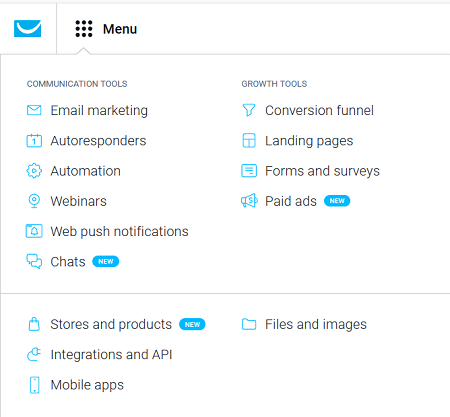
GetResponse delivers a marketing automation suite that’s near the top of the class. While its other features are basic, GetResponse focused its efforts on its Automation workflows. Most users say that the GetResponse automation rivals Salesforce, Pardot and HubSpot. The Automation workflow is drag and drop, easy to use and incredibly intuitive.
AutoFunnels – Easy and Intuitive to set up
AutoFunnel lets companies create visual funnels like webinars and then move into selling products. Being able to track and quantify the customer journey is critical. If you want to sell an e-book or an online webinar, GetResponse now integrates these e-commerce capabilities to enable these payments. You can set up auto-response emails to trigger once a customer makes a purchase through AutoFunnel.
GetResponse Pros
- Easy to use
- Powerful auto-responder options
- Solid email marketing features
- Mobile app for iOS & Android
- 24/7 Chat support
GetResponse Cons
- Analytics are underwhelming
- Lacks 24/7 phone support
- 30-day free trial period no fully free plan
Final Thoughts
GetResponse is versatile, easy to use, and covers most small businesses marketing needs in one affordable and feature-rich interface. GetResponse offers great third-party integration, and its free trial includes a large base of up to 1,000 contacts. Campaigner and Aweber offer lower pricing and phone support which beats GetResponse in both areas. GetResponse has great automation workflow but really loses to Aweber in all other areas.
GetResponse offers basic, easy to use email automation for beginners, but there are better and cheaper email automation platforms out there including Aweber.
Ready to Start Your Side Hustle? We Can Help!
Start your side hustle today with this FREE ebook!